
Introduction
When working with large datasets in Microsoft Excel, exporting to PDF is a common need—especially for sharing or printing reports. However, when the Excel sheet is wide (with many columns), exporting directly often leads to cut-off content, unreadable scaling, or multiple-page spreads that are hard to follow. In this tutorial, we’ll show you how to export a wide Excel sheet as a PDF cleanly and professionally.
🚩 Common Problems When Export Wide Excel Sheet to PDF
Before jumping into solutions, it’s important to understand the key problems users face:
- Columns Get Cut Off: By default, Excel doesn’t scale wide sheets to fit the PDF page width.
- Tiny Text: Auto-scaling can reduce font size drastically, making the content unreadable.
- Multi-Page Horizontal Scrolling: PDFs may span multiple pages horizontally, splitting rows and disrupting readability.
- Misaligned Layout: Improper print area settings can lead to inconsistent formatting.
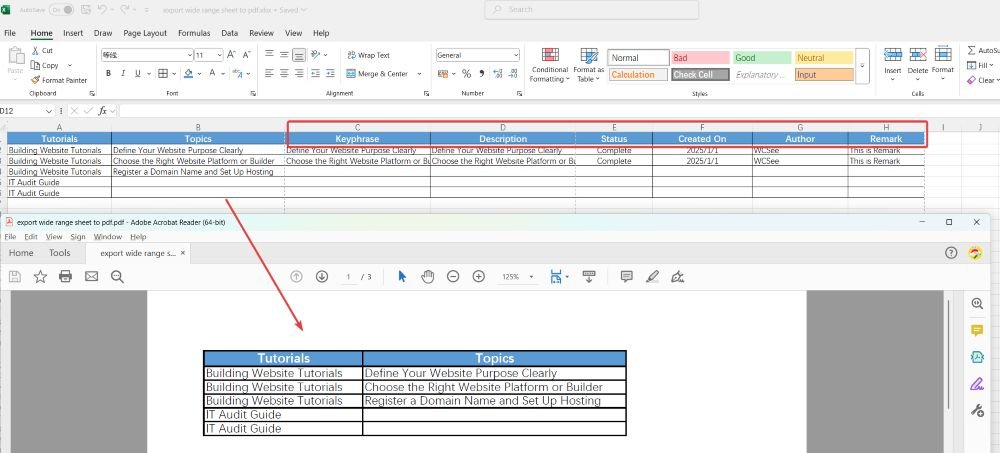
✅ Step-by-Step Guide: Export Wide Excel Sheet to PDF
1. Set the Print Area
Select the entire area you want to export:
- Go to Page Layout > Print Area > Set Print Area.
2. Adjust Page Orientation and Paper Size
- Go to Page Layout > Orientation, choose Landscape.
- Set Paper Size to A3 or Legal if available (larger page width).
3. Scale to Fit One Page Width
- Under Page Layout > Scale to Fit:
- Set Width to
1 page. - Set Height to
Automaticor1 pageif needed.
- Set Width to
4. Use Print Preview to Adjust
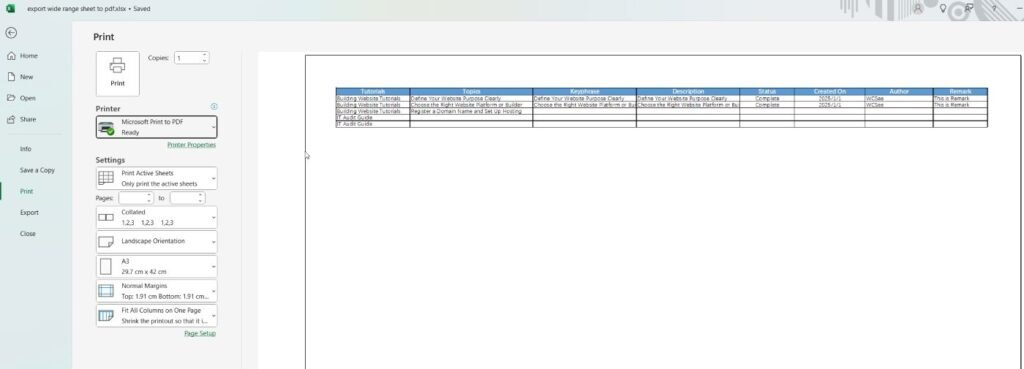
- Go to File > Print.
- Choose Microsoft Print to PDF or Save as PDF as your printer.
- Under Scaling, select Fit All Columns on One Page.
5. Export the PDF
- Choose File > Export > Create PDF/XPS or File > Save As > PDF.
- Click Options to confirm export area and page settings.
- Save and review your PDF.
💡 Bonus Tips
- Reduce column width or shrink font size slightly if the sheet is still too wide.
- Remove unused columns or rows to minimize white space.
- Consider splitting the data into separate sections if it’s too large to be readable even after scaling.
- For repeat tasks, you can automate export settings using a simple VBA macro.
Conclusion
Now you know how to export a wide Excel sheet as a PDF the right way—no more cut-off columns or unreadable printouts. With the right combination of print area settings, scaling, and orientation, you can generate professional and shareable PDFs from Excel effortlessly.
For more tips on OA tools, check out: IDE and OA Tool Tips | Productivity Hacks & Best Practices










Related posts:
 Unity in Practice 0009 – How to Use Sprite Sheets in Unity for 2D Animation and UI
 IT Audit Guide 06: IT Audit Templates and Checklists
 How to Check SSL/TLS Versions and Cipher Suites on macOS and Windows
 Introduction to System Design: A Comprehensive Overview of Core Concepts and Thinking Frameworks
 How to Build a Website from Scratch (Step-by-Step Guide for Beginners)
 IT Strategy and Planning Step 7: Analyze Scenarios and Strategic Options
IT Strategy and Planning Step 9: Define the future IT Operating Model
Define Your Website Purpose Clearly | Building Website Tutorials Part 1
IT Strategy and Planning Step 7: Analyze Scenarios and Strategic Options
IT Strategy and Planning Step 9: Define the future IT Operating Model
Define Your Website Purpose Clearly | Building Website Tutorials Part 1